Golf Simulator vs Launch Monitor
They are not two products. A simulator is a launch monitor with a screen, a projector and a room built around it — which is why the room, not the device, decides what you can buy.
How this is funded: we earn a commission if you buy through our links, at no extra cost to you. It never changes which product we recommend, and we’ll tell you when we’d skip one. Full disclosure.
If you want one answer: buy a launch monitor, not a simulator. A simulator is not a different device, it is a launch monitor plus a screen, a projector, an enclosure, a mat and a room built around all four. The sensor is the part that does the work, and the consumer radar units already offer a simulated-course mode — which means you can have most of the fun for a fraction of the money and none of the construction.
For a beginner the honest recommendation is the Garmin Approach R10: it publishes the widest set of real metrics for mid-range money and it includes simulator features, with the one caveat that Garmin’s Home Tee Hero course play needs an active membership. The picks are in the table below, after the part that actually decides this purchase.
What each one actually is
A launch monitor is a sensor. Radar units sit behind the ball and watch the ball and clubhead move away; camera units photograph impact. Either way the output is numbers: club head speed, ball speed, launch angle, carry distance and, on some units, spin.
A simulator is a system. It needs the monitor, software with courses in it, something to display that software on, something to stop the ball — a net or a full enclosure — and a mat to hit from. Every one of those is a separate purchase, and the display and the enclosure are usually the two biggest. A “simulator package” is just those parts sold together.
That is why comparing the two on price is misleading. The sensible comparison is between a launch monitor on its own and a launch monitor plus roughly a room. Our launch monitors roundup covers the sensor half in full.
The room decides this, not the device
This is the criterion that eliminates options, so it goes first. Radar monitors measure in the direction the ball travels, and the makers publish how much space that takes. Garmin asks for the R10 to sit six to eight feet behind the tee location and for the tee to be at least eight feet from the net indoors. Rapsodo publishes “a little more than 14 total feet” for the MLM2PRO.
Add it up and a home radar setup wants roughly fourteen to sixteen feet of clear length. A simulator wants that plus room for a screen and a projector throw, and a ceiling high enough for a full backswing with your longest club. Most garages are wide and short, which is the wrong shape for both.
Two measurements, before any purchase. Length: stand where the ball will sit and check you have clear floor both behind you and in front of you. Height: make a slow full backswing with your driver where you intend to hit. If the clubhead touches a ceiling, a beam, a light or a garage door track, that club is not usable in that room whatever you buy. Plenty of indoor setups are wedge-and-iron only, which is still worthwhile practice.
What the course modes cost after you have bought the device
This is where simulator budgets quietly double, and it is easy to miss at checkout. Garmin’s R10 gives you practice metrics with no subscription, but Home Tee Hero — the simulated-course mode most people picture when they imagine a home setup — requires an active Garmin Golf membership, published by Garmin at $9.99 a month or $99.99 a year.
Rapsodo ships the MLM2PRO with a 45-day Premium trial; after that Rapsodo publishes Premium at $199.99 a year, $329.99 for two years or $599.99 for a lifetime licence, and states that advanced features including full-course access and club data need the membership. The cheaper pocket units have no subscription at all, because they have no course mode to put behind one.
Run the numbers over three years rather than over the sticker price. A $600 unit with no subscription and a $350 unit with a $200-a-year membership cross over faster than most buyers expect.
Measured numbers versus modelled ones
One more thing separates these devices, and it matters more than the course list. Every monitor publishes a pile of metrics, and makers count them differently: some numbers are measured, and some are calculated from the ones that were measured.
Rapsodo publishes this split on its own product page — eight parameters measured, the rest derived. At the budget end it is starker and more honest than people expect: PRGR’s own manual states its unit displays club head speed, ball speed, smash factor and an estimated flight distance, derived from accumulated swing data rather than measured. That is a specification, not a criticism. A pocket doppler meter is a speed meter with a distance estimate attached.
The practical consequence: if you want to know why the ball curved, you need spin and launch direction, which the cheapest units do not read. If you want to know how fast you swing — the number that tells you which shaft flex to order— the cheapest unit answers that as well as the expensive one.
The three honest routes, cheapest to most complete
Each of these is a pick from our launch monitors roundup, chosen here for how much of the simulator experience it delivers for the money. Prices are live and dated; specs come from each listing, read on the date shown in the row.
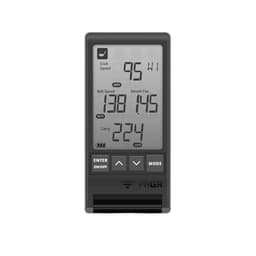
PRGR HS-130A Portable Launch Monitor
The honest entry point. It reads the two speeds that actually matter to a beginner, works them into a smash factor, and estimates the distance. No phone, no app, no account and no subscription -- four AAA batteries and a number after every swing.
- What it is
- Pocket doppler speed meter
- Who it’s for
- Anyone who only wants speed numbers, with no phone, app or subscription
Specs read from the product listing, on September 15, 2026.
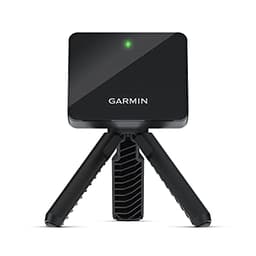
Garmin Approach R10 Portable Launch Monitor
The safe default if you are buying one at all. Radar, a long battery, more than a dozen club and ball metrics, and — unusually — a manufacturer that publishes exactly how much floor space the thing needs. Two honest caveats: it does nothing without your phone, and the simulated golf most people buy it for is a paid membership on top.
- What it is
- Radar monitor with simulator modes
- Who it’s for
- The beginner who wants real metrics now and course play later
Price as of October 5, 2026. #ad How we’re funded
Specs read from the product listing, on September 15, 2026.
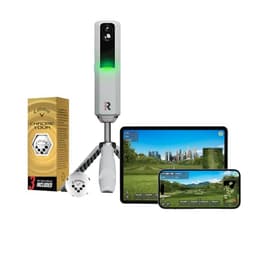
Rapsodo MLM2PRO Mobile Launch Monitor
The one that shows you the shot rather than only the numbers. Two cameras and a doppler radar, and video of the strike itself, which is the feedback a beginner can genuinely use. The catch is the membership: spin, video analysis and course play are Premium features once the 45-day trial runs out.
- What it is
- Camera and radar, RPT balls for spin
- Who it’s for
- Golfers who want to see the strike on video, and will pay the membership
Specs read from the product listing, on September 15, 2026.
| Pick | What it is | Who it’s for |
|---|---|---|
| PRGR HS-130A Portable Launch Monitor | Pocket doppler speed meter | Anyone who only wants speed numbers, with no phone, app or subscription |
| Garmin Approach R10 Portable Launch Monitor | Radar monitor with simulator modes | The beginner who wants real metrics now and course play later |
| Rapsodo MLM2PRO Mobile Launch Monitor | Camera and radar, RPT balls for spin | Golfers who want to see the strike on video, and will pay the membership |
What to buy before any of this
Three things, in this order, and they cost less than the cheapest monitor here between them.
A net. A launch monitor does not stop a golf ball, and a simulator without an enclosure is a broken window. Our practice nets roundup covers the sizing and the two measurements to take first.
A mat. The surface under the ball decides what your practice teaches you, and hitting off concrete teaches your wrists something you do not want to learn. Our hitting mats page explains why footprint and turf depth beat every other spec.
A lesson. An hour with a coach will change your strike more than a season of numbers will, and most coaches already own a monitor far better than anything on this page. Our guide to whether golf lessons are worth it is honest about when they are not.
The bottom line
A simulator is a room project. A launch monitor is a purchase. For a beginner the launch monitor wins on every axis that matters: it costs a fraction as much, it fits a space you already have, it gives you the three numbers you can actually act on — club head speed, smash factor and average carry — and the consumer units play courses anyway if you pay the membership.
Build the simulator later, if the net, the mat and the monitor are getting used every week. That is the test, and it costs a few hundred dollars to run instead of a few thousand. If your scores are being lost inside a hundred yards — and for nearly every beginner they are — a putting mat will take more shots off your card this season than either device on this page.
Frequently asked questions
What is the difference between a golf simulator and a launch monitor?
A launch monitor is the sensor: it measures the ball and the club and reports numbers. A simulator is that sensor plus the things that turn numbers into a picture — software with courses, a screen or projector, an impact net or enclosure, a mat, and a room big enough for all of it. Every simulator contains a launch monitor; no launch monitor is a simulator on its own.
Can you use a launch monitor as a golf simulator?
Most of the consumer radar units do offer a simulated-course mode, and that is the cheapest route into one. Garmin's Approach R10 includes simulator features, but Home Tee Hero course play requires an active Garmin Golf membership, published by Garmin at $9.99 a month or $99.99 a year. Rapsodo's MLM2PRO ships with a 45-day Premium trial, after which Rapsodo publishes Premium at $199.99 a year, $329.99 for two years or $599.99 for a lifetime licence, and states that full-course access sits behind it.
How much space does a golf simulator need?
More length than most garages have. Garmin's own figures for the R10 ask for the device 6 to 8 ft behind the tee and the tee at least 8 ft from the net indoors; Rapsodo publishes 'a little more than 14 total feet' for the MLM2PRO. Add a projector throw and you need more again. Measure the length of your space with a tape and make a slow full backswing with your longest club before you buy anything.
Is a golf simulator worth it for a beginner?
Rarely, as a first purchase. A net, a mat and a lesson cost a fraction of a simulator setup and do more for a new swing, and the numbers a simulator shows are mostly useful to a coach rather than to you. The honest beginner version of the purchase is a launch monitor you can also play courses on — you get the practice feedback now and the entertainment without building a room.
Do I need special golf balls for a simulator or launch monitor?
For spin readings on the Rapsodo MLM2PRO, yes — Rapsodo states that balls carrying its RPT marking are required for spin, and three come in the box. Everything else reads a normal golf ball. Voice Caddie notes its monitor is not designed to assess non-standard balls, so the foam and plastic practice balls many people use indoors will not read reliably on any of these units.
Sources
- Garmin -- Approach R10 Owner's Manual: Preparing for a Shot — The maker's published setup requirements: place the launch monitor on the ground between 6 ft and 8 ft (1.8 m and 2.4 m) behind the tee location; the tee location must be at least 8 ft (2.4 m) away from the net when playing indoors; the red alignment line must be aligned with the tee location and the target of the shot; shots are measured within a 2 x 2 ft (0.6 x 0.6 m) hitting area beginning 6 ft (1.8 m) from the launch monitor; ceiling height and net height must allow for high-lofted or errant shots (accessed September 15, 2026)
- Garmin — Tips for Indoor or Outdoor Approach R10 Placement (support) — Garmin's published minimum indoor hitting space: 'Your space must be at least 15 feet long by 8 feet wide by 8 feet high', the mat at least 2 ft by 2 ft, and the ball at least 8 ft from the impact screen or net, with the device on the ground 6 to 8 ft behind the ball and its red line aligned to the target. Also: the device should sit near the same height as the ball and can be raised on a flat object, and 'use the tripod stand that came with the Approach R10. Using other mounts, or attempting to attach it to a wall, could result in inaccurate readings or error messages' (accessed September 22, 2026)
- Garmin -- Garmin elevates the golf simulator experience with Home Tee Hero upgrades (press release) — States that Home Tee Hero requires an active Garmin Golf membership, that it carries more than 43,000 preloaded golf courses, and that some Garmin launch monitors -- the Approach R10 among them -- require pairing with a compatible smartphone, where the Approach R50 does not (accessed September 15, 2026)
- Garmin -- Green Contour data comes to the Garmin Golf app (press release) — Garmin's published membership pricing: 'Golfers can purchase a Garmin Golf membership for $9.99 a month, or $99.99 a year', together with the note that Garmin Golf members who buy an Approach R10 receive the Home Tee Hero golf simulator with that membership (accessed September 15, 2026)
- Garmin — What Golf Simulator Features Are Available With My Approach Launch Monitor? (support) — Lists the R10's simulator options inside the Garmin Golf app — Home Tee Hero, Practice (virtual range), Weekly Tournament, and Other Simulators, naming Awesome Golf, Creative Golf, The Golf Club 2019, GSPro and TruGolf E6 Connect as compatible third-party apps. States that a Home Tee Hero virtual round can be played on more than 43,000 courses, that up to four players can share a single launch monitor and Garmin account, and that 'a Garmin Golf membership is required for this feature' (accessed September 22, 2026)
- Rapsodo -- MLM2PRO Mobile Launch Monitor + Golf Simulator (product page) — The maker separates eight MEASURED parameters (ball speed, launch direction, club speed, launch angle, spin rate, spin axis, club path, angle of attack) from the calculated ones (smash factor, carry distance, total distance, descent angle, side carry, apex, shot type); listed as Apple and Android compatible, so a phone or tablet is required; the box holds the device, a tripod, a charging cable and a three-ball sleeve of RPT-marked balls, with a 45-day Premium trial included; 'Golf balls with RPT are required to show spin numbers'; indoor space: 'A little more than 14 total feet is needed. First, 8 feet is needed from ball to the net. Then, the MLM2PRO requires another 6.5-8.5 feet behind the ball' (accessed September 15, 2026)
- Rapsodo -- MLM2PRO Premium Membership — Published membership pricing and contents: $199.99 billed every year, $329.99 billed every two years, or $599.99 as a one-time lifetime payment, after a 45-day trial that auto-renews into a year; Premium covers 30,000+ courses, cloud session storage, advanced data and analytics, Impact Vision video analysis and the measured spin rate and spin axis metrics, and Rapsodo states that advanced features including club data and full-course access require the membership (accessed September 15, 2026)
- PRGR -- HS-130A Portable Launch Monitor User's Manual — The manufacturer's manual (PRGR CO., LTD., Tokyo), hosted by ManualsLib: in golf mode the device displays club head speed, ball speed, smash factor and an ESTIMATED flight distance which can be switched between carry and total; it runs on commercially sold AAA alkaline batteries; the estimated distance is described as derived from large amounts of accumulated swing data rather than measured, and the manual warns that measurement may not be possible depending on the materials of surrounding objects or their distance (accessed September 15, 2026)
Keep reading
Best Golf Launch Monitors for Beginners
Five units ranked with live prices, from a pocket speed meter to a camera-and-radar unit — plus the room each one asks for.
See the launch monitorsGarmin Approach R10 Review
The closest thing to a simulator you can buy without building a room, read against Garmin's own published tolerances.
Read the reviewBest Golf Practice Nets
The purchase that unlocks home practice, and the one to make before any screen or sensor.
See the netsBest Golf Hitting Mats
The surface under the ball decides what your practice teaches you — footprint and turf depth beat every other spec.
See the matsBest Putting Mats
The cheapest home practice there is, aimed at the half of your scorecard a simulator cannot help with.
See the putting matsBest Golf Training Aids
The cheap tools that fix aim and rhythm — and why we left launch monitors off that list.
See the training aids